Outplayed Review 2026: Overwolf's Automatic Highlight Reel
Outplayed leans on Overwolf's overlay ecosystem to auto-detect highlights across a huge list of games. Here's what that buys you over just running Medal — and what it costs in background overhead.
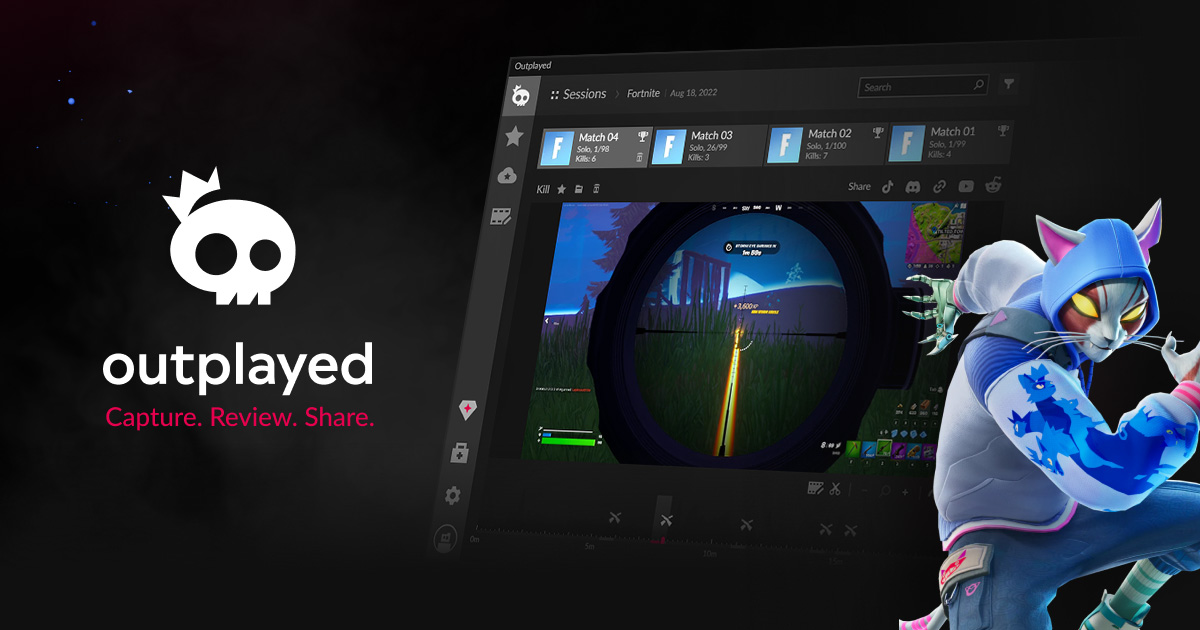
Outplayed is built by Overwolf, the same company behind the in-game overlay platform that powers a wide range of gaming apps, and it leans directly on that ecosystem: install Overwolf, and Outplayed rides on top of it to automatically capture and organize your best gaming moments across an unusually large list of supported titles.
What Outplayed actually does
Outplayed offers two main capture modes: Highlights mode automatically detects game events and saves clips around them — you choose which event types count — while Full Match mode records continuously from the moment you start a match until it ends. On top of automatic capture, you can manually record any supported game with a hotkey. Once you've got clips, a match timeline lets you scrub through the session, review your best (and worst) moments, and check basic performance stats, before trimming clips or combining several into a longer collage in the built-in video editor and sharing directly to social platforms including YouTube. Outplayed's headline number is scale: it claims support for over 5,000 games, well beyond the shorter curated list most auto-clipping tools focus on.
That 5,000-game figure matters more than it might first appear. Most gaming-specific capture tools build event detection around a handful of the biggest competitive titles, which is fine if you play those and useless otherwise. Outplayed's broader net means a much longer tail of less mainstream titles get at least some automatic capture support, even if the event-detection quality inevitably varies more across a list that size than it would across a curated shortlist of five or six flagship games.
The Overwolf dependency, honestly
The thing to understand before installing Outplayed is that it isn't a standalone app — it requires the Overwolf client and an Overwolf account to run, since Outplayed is distributed as an app inside that platform rather than a separate installer. Overwolf's overlay runs in the background whenever you're gaming, which is exactly how Outplayed gets its automatic capture working, but it also means you're running an additional persistent background process, and Overwolf itself is known primarily as a bring-your-own-app-store for gaming overlays rather than a lightweight utility. If you'd rather not have another overlay platform running alongside your game, that's a real cost to weigh against the 5,000-game support number.
Free vs. Premium
Outplayed is free with ads, and that free tier includes the core capture, review, and sharing workflow. A Premium subscription removes ads, removes the Outplayed watermark from clips, and changes hosting from a 3-month expiration to unlimited-time hosting on outplayed.tv for content uploaded after March 2025, plus a better fullscreen playback mode. Subscription management runs through Tebex rather than a simple in-app price list, and Outplayed doesn't publish a single fixed headline price the way a SaaS pricing page would — check the Plans tab inside the Overwolf client for your current rate rather than trusting any number quoted secondhand, including here.
The 3-month hosting expiration on the free tier is worth flagging specifically, because it's a different kind of limit than a watermark or a resolution cap — it's a countdown on content you've already made. If you're capturing highlights you want to keep referencing or resharing months later, that expiration is the free tier's real cost, more so than the ads most people tune out anyway.
Reading the reviews honestly
Outplayed's public review score sits around 4.6 out of 5 across a large number of ratings, which is solid, but the written reviews skew toward two recurring complaints worth knowing before you install: recorded file sizes growing large enough to eat through disk space faster than expected, and recording occasionally cutting off right at a match's win screen rather than capturing the full celebration. Neither is disqualifying, but both are the kind of rough edge you only find in user reviews, not marketing copy — worth a glance at current app-store feedback before you commit disk space to it.
| Pros | Cons |
|---|---|
|
|
Outplayed vs. Medal
Scores are ClipWick's editorial judgment based on published specs, pricing pages, and demo footage — not lab-measured benchmarks. Treat them as a starting point, not gospel.
The honest split: Outplayed wins on sheer game-list breadth and its collage-style editor; Medal wins on being lighter-weight, genuinely cross-platform (PC and mobile), and offering audio-track control Outplayed doesn't match. If you already run Overwolf for other in-game apps, Outplayed is close to a free add-on. If you don't, installing an entire overlay platform just for gameplay capture is a heavier lift than Medal's standalone app. See our Medal review for the other side of that trade-off — the two are close enough in core capability that "which background app do I already trust" is a fair way to break the tie.
Who Outplayed is actually for
Gamers who play across a wide range of titles beyond the usual battle-royale/shooter shortlist, and who are already comfortable running Overwolf (or plan to, for its other in-game apps). The Full Match plus Highlights combination also suits players who want the option to review an entire session, not just auto-detected peak moments — reviewing a full match afterward for your own improvement is a genuinely different use case than just farming shareable highlight clips, and Outplayed is one of the few tools here that supports both without extra setup.
Who should skip it
Anyone who wants gameplay capture without adding another background overlay platform, or who needs mobile capture — Outplayed is PC-only through Overwolf, with no equivalent mobile app the way Medal offers. If minimal background footprint matters more than game-list breadth, that's the deciding factor.
The bottom line
Outplayed's real selling point is scale — 5,000+ supported games is hard to match — and its free tier is a legitimate way to get automatic gameplay highlights with no upfront cost. The trade-off is accepting the Overwolf client as a permanent background resident, which is a bigger ask than a standalone capture app. Worth it if you're already in the Overwolf ecosystem or play enough different games that a curated shortlist elsewhere wouldn't cover you; skip it if a lighter-weight, standalone tool is a higher priority than game-list breadth.
If you're deciding between the two purely on game-list breadth versus footprint, run the actual math on your own library first: check whether the specific titles you play are even on Medal's shorter supported list before assuming you need Outplayed's wider net. For the handful of major titles both tools cover well, the choice comes down to whether you're willing to run Overwolf at all — everything else is a secondary consideration.
Related
Medal Review 2026: Free Gaming Clips, With a Real Catch
Background game capture with real event detection — and a free tier that's actually usable.
CLIPWICK · 2026
Best Gaming Mouse Setups for Content Creators
What actually matters for editing and gameplay capture, not just DPI numbers.
CLIPWICK · 2026